Three Intelligent Send Methods
Choose how you want to personalize your outreach for maximum impact.
Send as Written
Send your exact message to everyone. Perfect when you've crafted the ideal outreach message and want consistency.
Smart Automation
Uses templates with @user and @keyword placeholders. Automatically extracts names from profiles and keywords from posts.
AI-Personalized Outreach
Powered by Google Gemini AI. Analyzes each profile and post to generate truly unique, contextual messages that feel human-written.
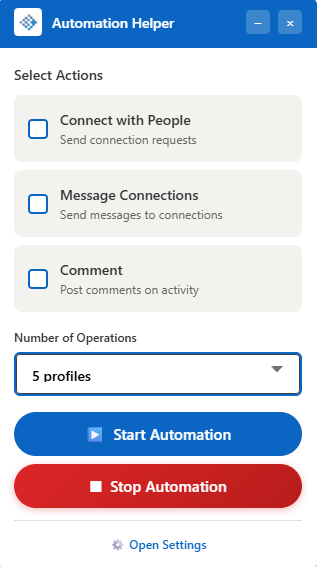
Simple Action Selection
Select one or multiple actions with a single click. Choose to Connect, Message, or Comment—or do all three at once. Set your number of operations and hit Start.
- Multi-action support (run all 3 simultaneously)
- Configurable number of operations (profiles to process)
- One-click Start/Stop controls
Personalized Connection Notes
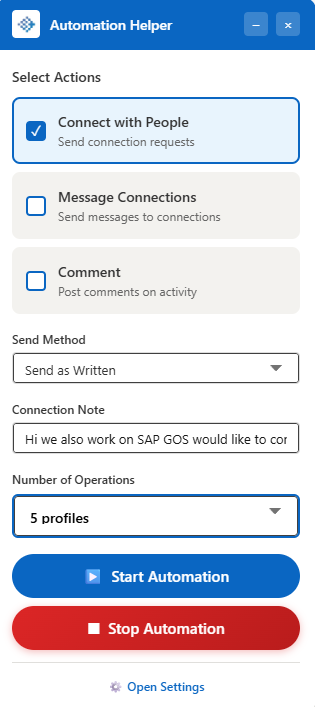
When you select "Connect with People", a Connection Note field appears. Choose your Send Method and craft your message. Smart Automation replaces @user with the person's actual name.
- Dynamic @user placeholder for names
- AI generates unique notes per profile
- References their headline and experience
Complete Outreach Suite
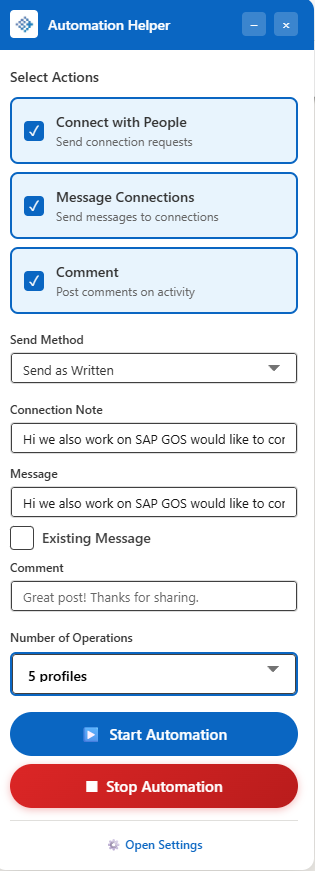
When all three actions are selected, you get full control: Connection Note, Message, Comment fields. The "Existing Message" checkbox intelligently continues existing DM threads instead of starting new ones.
- Separate customization for each action
- "Existing Message" for follow-up sequences
- @keyword extracts topics from posts for comments